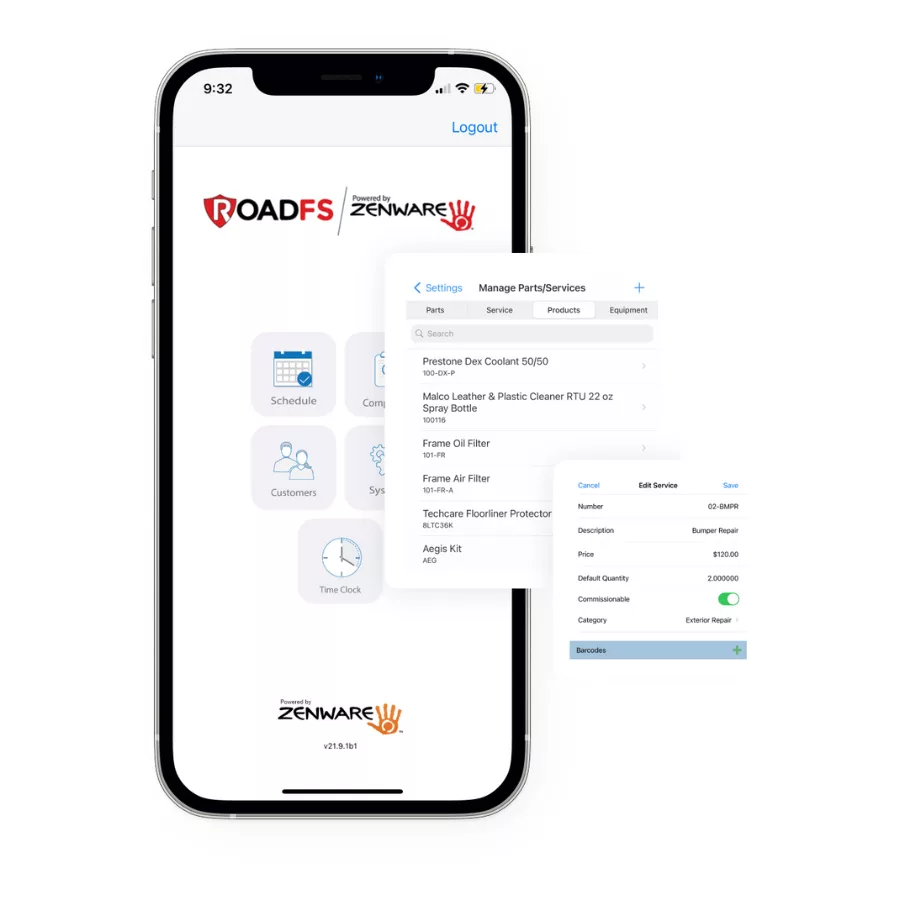
Auto detail POS software revolutionizes inventory management by integrating parts tracking, billing, and real-time stock updates into a single, seamless workflow. Instead of relying on manual entry and split systems, shops can automate inventory adjustments as parts are used, reduce errors with barcode scanning, and manage stock from anywhere using mobile devices. This not only saves time and reduces staff workload but also ensures accurate inventory counts, faster repairs, and clearer billing for customers. By choosing an auto detail POS system designed for auto repair, shops gain tighter control over inventory, streamline daily operations, and deliver a more professional, reliable service experience.
How Auto Repair POS Software Streamlines Inventory Management
Inventory is one of the most overlooked profit centers in an auto detail shop. When parts are not tracked properly, margins leak quietly—through shrinkage, miscounts, outdated pricing, and inventory mismatches.
Modern auto repair POS software streamlines inventory management by connecting parts usage, supplier pricing, stock levels, and repair orders in one unified system. Instead of relying on manual tracking or disconnected spreadsheets, shops gain real-time visibility into what is on the shelf, what has been used, and what needs to be reordered.
An inventory-focused POS system is not just about processing transactions. It is about protecting margins, maintaining accurate stock levels, and ensuring that every part used is properly tracked and accounted for.
Why Inventory Cost Auto Repair Shops Money
Inventory issues rarely appear as one big mistake. Instead, they show up in small daily breakdowns:
- A part or consumable products is used but never tracked
- Shelf counts do not match system records
- Outdated pricing is used on tickets
- High-demand products like ceramic coatings run out unexpectedly
- Slow-moving inventory ties up cash
These small inconsistencies reduce profitability and create friction between advisors, technicians, and management.
When inventory management depends on manual entry or delayed updates, errors are inevitable. A connected POS system reduces these risks by automating inventory tracking at the point where parts are actually used.
The Benefits of a POS System for Auto Detail Shops
Implementing a modern POS system in an auto detail shop reshapes how inventory is managed across daily operations. By automating inventory tracking, integrating supplier data, and connecting parts directly to repair orders, the system improves stock accuracy, reduces manual adjustments, and strengthens internal workflows.
Below are the core inventory-focused benefits a POS system delivers, helping auto repair shops operate more efficiently, protect margins, and maintain tighter control over their parts management process.
Real-Time Inventory Tracking and Control
A modern auto repair POS system streamlines inventory management by automatically tracking parts as they are added to repair orders.
When a part is added to a repair order, the system can automatically:
- Deduct it from available inventory
- Update on-hand quantities
- Record supplier information
- Apply correct pricing and markup
- Reflect usage in reporting dashboards
This eliminates the need for separate end-of-day inventory adjustments and reduces discrepancies between physical stock and digital records.
Real-time tracking allows shop owners to see:
- Current stock levels
- Usage trends
- Reorder points
- Inventory valuation
- Profit margins by part category
Inventory becomes proactive instead of reactive.
Mobile POS for Inventory Management Extensions
Mobile POS functionality extends inventory management beyond the front desk.
Instead of being tied to a single workstation, team members can:
- Check stock levels from anywhere in the shop
- Confirm part availability before creating estimates
- Update inventory counts during physical checks
- Access part details without interrupting workflow
Mobile access supports inventory visibility and coordination between service advisors and technicians. It strengthens operational control rather than focusing solely on checkout speed.
This flexibility is especially valuable in busy or multi-bay environments where speed of internal communication matters.
Inventory Reporting and Smarter Purchasing Decisions
Accurate inventory data leads to better business decisions.
With integrated reporting tools, shop owners can analyze:
- Fast-moving vs slow-moving parts
- Inventory turnover rates
- Supplier performance
- Overstock risks
- Margin performance by category
Instead of guessing what to reorder, shops can rely on actual usage data.
This reduces excess stock, prevents cash from being tied up unnecessarily, and ensures that high-demand items are always available.
Reducing Staff Workload Through Automation
Manual inventory reconciliation takes time.
When parts tracking is automated within the POS system:
- Fewer manual adjustments are needed
- End-of-day cleanup is reduced
- Inventory corrections decrease
- Staff spend less time reconciling discrepancies
Automation reduces administrative burden and allows advisors to focus on customer service while technicians focus on repairs.
Inventory control becomes embedded in daily workflow rather than treated as a separate task.
Protecting Margins Through Inventory Accuracy
Untracked parts and inaccurate stock counts quietly erode profitability.
A structured auto detail POS inventory system protects margins by ensuring:
- Every part used is recorded
- Markups are applied consistently
- Stock levels are accurate
- Pricing is current
- Supplier data is organized
When inventory management is precise, revenue leakage is minimized and financial reporting becomes more reliable.
What to Look for in an Inventory-Focused Auto Detail POS System
When evaluating POS software for inventory management, consider whether the system:
- Tracks product usage in real time
- Updates stock levels automatically
- Supports barcode scanning
- Provides inventory reporting dashboards
- Offers mobile inventory access
- Integrates with accounting platforms like QuickBooks
The goal is not complexity. The goal is operational clarity.
A strong system should simplify inventory control rather than add layers of administration.
Frequently Asked Questions About Auto Repair POS Software
1. What is auto detail POS software and how does it differ from generic POS systems?
Auto detail POS software is specifically designed for the unique needs of auto repair shops. Unlike generic POS systems, it integrates features such as labor rate calculations, parts lookup, vehicle history tracking, and service reminders, along with real-time inventory tracking, supplier integration, and automated stock updates that connect parts usage directly to repair orders. This streamlines both front-desk and back-office operations while protecting inventory accuracy.
2. How does a POS system improve transaction speed at the service counter?
A POS system automates invoice creation, parts entry, and payment processing, reducing manual data entry and eliminating the need to switch between multiple tools. This speeds up each step of the checkout process, resulting in faster service for customers.
3. Can auto repair shop POS software help reduce pricing and billing errors?
Yes, by using built-in labor guides, automated parts pricing, and digital workflows, POS software minimizes human error, ensures consistent pricing, and reduces the risk of mistakes in billing and invoicing.
4. What features should I look for in POS software for an auto repair shop?
Key features include integrated labor charges, real-time parts lookup, barcode scanning, digital receipts, inventory management, and seamless payment processing. These tools help streamline operations and improve accuracy.
5. Is it difficult to switch from a manual or legacy system to a modern POS solution?
Most modern POS providers offer onboarding support, data migration, and training to make the transition as smooth as possible. It’s important to plan ahead, back up your data, and choose a provider with a strong support team.
6. How does digital invoicing benefit my customers?
Digital invoicing provides customers with instant, paperless receipts that are easy to store and retrieve. This enhances convenience, reduces lost paperwork, and improves overall customer satisfaction.
7. Will a POS system help with inventory management in my auto repair shop?
Absolutely. POS systems with inventory management features track parts usage in real time, alert you to low stock, and help prevent mismatches between inventory and invoices.
8. How can a POS system reduce staff workload?
By automating repetitive tasks such as invoice creation, payment reconciliation, and inventory tracking, a POS system allows staff to focus on higher-value activities like customer service and shop management.
9. What should I consider before switching to a new auto repair POS system?
Evaluate your shop’s specific needs, check for integration with existing tools, assess ease of use, review customer support options, and ensure the system offers the features most important to your workflow.
10. How does photo documentation in auto repair POS software help protect my business and support upselling?
Photo documentation allows you to capture and store images of vehicle damage or completed repairs directly within the POS system. This not only protects your business by providing visual records but also enables advisors to showcase work to customers, supporting transparency and creating upselling opportunities.
11. Can RoadFS POS software integrate with QuickBooks and credit card processors like Square?
Yes, RoadFS auto repair POS systems offer full integration with QuickBooks Online and Desktop for seamless accounting, as well as compatibility with credit card processors such as Square for efficient and secure payment processing.
Strengthening Shop Operations with Organized Inventory Control
Inventory management is not just a back-office function. It directly impacts profitability, workflow efficiency, and customer service.
Auto repair POS software designed with inventory management at its core connects parts tracking, supplier pricing, stock visibility, and reporting into one unified system.
With real-time updates, mobile access, barcode scanning, and integrated purchasing data, shops gain tighter operational control and reduce the small errors that quietly drain revenue.
When inventory is accurate, everything else runs smoother.
How to Get Started
Strong inventory control starts with the right system in place. An inventory-focused auto repair POS connects parts tracking, supplier pricing, stock levels, and reporting into one organized workflow. Instead of juggling spreadsheets or manual counts, your team works from a single platform that keeps inventory accurate and visible in real time.
Getting started is straightforward. Request a personalized demo to see how inventory tracking works inside real repair scenarios. From there, set up your parts catalog, configure pricing and markups, define reorder points, and assign user roles to control access and responsibilities.
When every part movement is tracked within one centralized system, your shop gains tighter operational control, cleaner reporting, and better margin protection — without adding complexity to your daily workflow.
Visit at:
RoadFS
7213 W. Potomac Dr. Boise, ID 83704
Check out:
roadfs.com
Call at:
888-936-4249
Social Profile:
Facebook
Instagram
Youtube
Strengthen your shop’s daily operations with auto repair POS software built to deliver accurate inventory control, streamlined workflows, and dependable performance.
Easy Ways to Get Started
- Get Started – Choose the CRM automotive solution that best fits your workshop’s workflow and operational needs.
- Schedule Demo – Select the CRM automotive system that aligns with your workshop’s workflow and daily operational requirements.